Wednesday, October 19, 2022

FreeBSD 13.1 as a Guest OS in VMWare Workstation 16 Player

 Five years ago, I installed FreeBSD 11 in a VMWare 12 Player. I wrote about the experience here : http://programount.blogspot.com/2017/05/freebsd-11-as-guest-os-in-vmware.html

Recently, I decided to do an upgrade. I installed FreeBSD 13.1 in a VMWare 16 Player. I followed the same steps that I took last time, and completed the installation. After the completion, I logged into the GUI login screen, only to be greeted by a black screen with a mouse cursor.

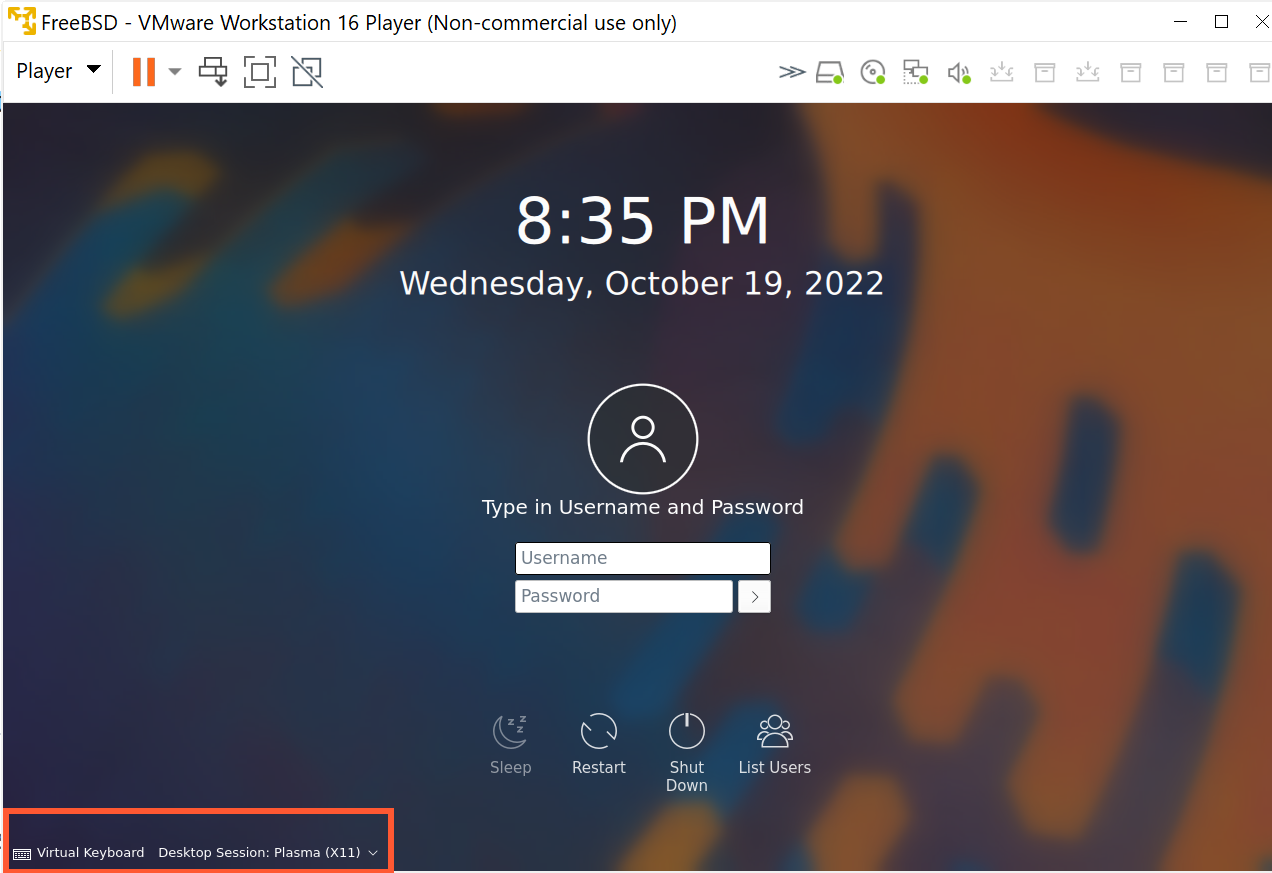
I spent a lot of time reading through many log files. Then by accident I noticed the drop down on the login screen:


The default selection was on "Desktop Session: Plasma (Wayland)". But I did not install "Wayland". In fact, at the site https://community.kde.org/FreeBSD/Setup, "Wayland" is crossed out. So I switched to "Desktop Session: Plasma (X11)", which is what I installed. After that, I logged in, and the Plasma 5 desktop is working.


Tuesday, October 26, 2021

Visual Studio 2019 Was "Unable to Locate .NET Core SDK"

Earlier today I noticed that Visual Studio 2019 (v16.11.5) could not load any of my .NET Core projects projects. When I tried to reload any of them, I got an error saying that "The project file cannot be opened. Unable to locate the .NET SDK" in the output pane, and then nothing happened.

A google search yielded suggestions saying that the version 2.x.xxx .NET Core SDK needed to be installed. Some said that "C:\Program Files\dotnet\" needed to be part of the "PATH" environment variable. Another said that an old "global.json" file was the cause. While each of these solutions worked for some folks, none seemed to work for me. I ran "dotnet --info" on the command line, and this is what I saw:


"No SDKs were found." Then I noticed a comment about x86 version of dotnet at https://superuser.com/questions/1431833/visual-studio-2019-unable-to-locate-net-core-sdk/1441219. I realized that I was running the x86 version of dotnet. Of course, in hindsight, the "C:\Program Files (x86)" paths in the runtime locations should have been a clear indication of the problem. Then I tried running the 64 bit version:


Well, now a whole list of SDKs showed up. It turned out that the paths to both the x86 version of dotnet and the 64 bit dotnet were in my "PATH" environment variable, and the x86 version was listed first. I do not know which installer made this change, for the projects were working fine at one time. I removed the path to the x86 version of dotnet from the "PATH" environment variable, and now everything works fine.

One interesting side-note: Window 11 complained about the size of the "PATH" environment variable, saying that its length had exceeded 2048. I replaced some folder paths with environment variable references, and reduced the length to below 2048. I wondered: when installer apps increased the "PATH" environment variable length to beyond 2048, why did not Windows complain? Would Windows just ignore the part after the first 2048 characters? Or would Windows use the whole "PATH" environment variable, even though its length exceeded 2048, just because some installer app did this? It turns out that a "PATH" environment variable longer than 2048 can cause real problems: https://superuser.com/questions/355594/windows-7s-path-and-environment-variables-are-corrupted, at least for older versions of Windows. For Windows 10, there is a discussion here: https://stackoverflow.com/questions/34491244/environment-variable-is-too-large-on-windows-10. From the look of the error dialog box, this should apply to Windows 11 as well.


Saturday, June 19, 2021

Getting Rid of the Annoying Air Gaps Along the Edges of a Tempered Glass Screen Protector on a Cell Phone

Installing tempered glass screen protectors on cell phones always takes a lot of patience, and the results are usually less than ideal: dust particles under the tempered glass screen protectors can leave air bubbles around them. Repeatedly lifting the tempered glass screen protector to get rid of the dust particles can leave air gaps along the edges of the tempered glass screen protectors that would not go away.

I found two things that could help in such situations:

1. Install the tempered glass screen protectors in a large, thin new transparent plastic gap. Rubbing the plastic bag to introduce some static charges onto the bag would reduce the amount of dust particles floating in the bag. By placing all necessary components needed for the installation into the bag gently, you would have a less dusty environment for installation.

2. After the installation of a tempered glass screen protector, if you see air gaps along the edges of the tempered glass screen protector, you can use a cotton swab soaked with distilled water (but not dripping), and dab it along an air gap to get the water into the gap. Once the water is in the air gap, press the tempered glass along the area where the air gap was to squeeze out the water. Clean off any water that you see. The air gap will be gone for good.

Monday, January 27, 2020

Windows 10 Disk Is Full but Windows Explorer Cannot Account for the Missing Space

Recently my laptop was running out of disk space. This laptop has an SSD of 512 GB size. Windows explorer showed that it had 0 byte left. But when I right clicked on the C drive and opened its "Properties" dialog box, The total used disk space was much less:


This was very strange. If I removed some files to make room, the free space would be gone automatically little by little, as time goes by.

Thanks to a free software called "WizTree" (https://antibody-software.com/web/software/software/wiztree-finds-the-files-and-folders-using-the-most-disk-space-on-your-hard-drive/), the culprit was identified very quickly: it was the Microsoft SQL Server Developer Edition. When the SQL Server is installed with "PolyBase Query Service for External Data", and when the TCP/IP protocol is not enabled for the SQL server, it will write more and more contents into its dump files  in the folder "C:\Program Files\Microsoft SQL Server\MSSQL15.MSSQLSERVER\MSSQL\Log\PolyBase\dump"(https://nielsberglund.com/2019/11/20/fix-polybase-in-sql-server-2019-developers-edition/).

However, when I clicked on the folder "C:\Program Files\Microsoft SQL Server\MSSQL15.MSSQLSERVER\MSSQL\Log" in Windows Explorer, or when I tried to open this folder by simply pasting it into the address box of an Explorer window, I got no response at all, as if I did nothing.

It turns out that the Microsoft SQL Server installer does not specify an owner for this folder. Apparently that was why its size was not included in the total size of all the files on my C drive!

Because the folder "C:\Program Files\Microsoft SQL Server\MSSQL15.MSSQLSERVER\MSSQL" is owned by "SYSTEM", I changed the owner of "C:\Program Files\Microsoft SQL Server\MSSQL15.MSSQLSERVER\MSSQL\Log" to SYSTEM as well. Once I did that, I was able to get into "C:\Program Files\Microsoft SQL Server\MSSQL15.MSSQLSERVER\MSSQL\Log" just like a normal folder.

I enabled the TCP/IP protocol on the SQL Server, restarted the PC, and then I removed all of the dump files and log files in the folder "C:\Program Files\Microsoft SQL Server\MSSQL15.MSSQLSERVER\MSSQL\Log\PolyBase\dump". Now the free space on my C drive is no longer disappearing on me anymore.


Wednesday, December 11, 2019

Error: "Microsoft.Net.Compilers is only supported on MSBuild v16.3 and above"

After installing "Microsoft.Net.Compilers.3.4.0", I was getting errors when building ASP .NET projects in Visual Studio 2019:

"...\packages\Microsoft.Net.Compilers.3.4.0\build\Microsoft.Net.Compilers.props(14,5): Error : Microsoft.Net.Compilers is only supported on MSBuild v16.3 and above"

This is a bug in Microsoft.Net.Compilers.3.4.0. Someone at Microsoft made a change in the file "Microsoft.Net.Compilers.props" without understanding the different terms. The section in question is

<Target Name="ValidateMSBuildToolsVersion" Condition="'$(BuildingProject)' == 'true'">
 <!-- The new editorconfig support requires MSBuild version 16.3. --> 

 <Error Text="Microsoft.Net.Compilers is only supported on MSBuild v16.3 and above" Condition="'$(MSBuildToolsVersion)' &lt; '16.3'" />
</Target>

Please note that this section is named "ValidateMSBuildToolsVersion", not "ValidateMSBuildVersion". While the "MSBuildVersion" is 16.4 in the "C:\Program Files (x86)\Microsoft Visual Studio\2019\<editionnamehere>\MSBuild\$(MSBuildToolsVersion)\, MSBuildToolsVersion itself is not 16.4! In fact, it may not even be a number, if Visual Studio decides to use the "Current" version. That is why in the prior version of "Microsoft.Net.Compilers.props", the check looked like this:

<Target Name="ValidateMSBuildToolsVersion" Condition="'$(BuildingProject)' == 'true'">
  <Error Text="Microsoft.Net.Compilers is only supported on MSBuild v15.0 and above"
Condition="'$(MSBuildToolsVersion)' == '2.0' OR

 '$(MSBuildToolsVersion)' == '3.5' OR 
 '$(MSBuildToolsVersion)' == '4.0' OR 
 '$(MSBuildToolsVersion)' == '12.0' OR 
 '$(MSBuildToolsVersion)' == '14.0'" />
</Target>


Of course, the error text in the prior version is a little misleading as well: it referred to "MSBuild v15.0", not "MSBuild Tools v15.0".

Right now, the MSBuildToolsVersion is set to "15.0" when you create a new project in Visual Studio 2019. You can use a text editor to open the project file and verify that. If you migrated your project from an older version of Visual Studio, the number could be smaller than 15.0.

But Visual Studio 2019 does not necessarily use this number. If Visual Studio 2019 does not find what it is looking for in "C:\Program Files (x86)\Microsoft Visual Studio\2019\<editionnamehere>\MSBuild\$(MSBuildToolsVersion)\", it would automatically set MSBuildToolsVersion to "Current", and use the folder "C:\Program Files (x86)\Microsoft Visual Studio\2019\<editionnamehere>\MSBuild\Current\". That was why the prior version of "Microsoft.Net.Compilers.props" does not use "Condition="'$(MSBuildToolsVersion)' < '15.0'", since a numeric comparison would not work on "Current"!

So, for now, the fix is to change this section to

<Target Name="ValidateMSBuildToolsVersion" Condition="'$(BuildingProject)' == 'true'">  
 <Error Text="Microsoft.Net.Compilers is only supported on MSBuild Tools v15.0 and above"
Condition="'$(MSBuildToolsVersion)' == '2.0' OR 

 '$(MSBuildToolsVersion)' == '3.5' OR 
 '$(MSBuildToolsVersion)' == '4.0' OR 
 '$(MSBuildToolsVersion)' == '12.0' OR 
 '$(MSBuildToolsVersion)' == '14.0'" />
</Target>


Now I am able to use "Microsoft.Net.Compilers.3.4.0" without errors.

Tuesday, July 9, 2019

Ubuntu with 4.15 Kernel in VMWare Shows Blank Screen without Login Prompt

Today I upgraded my Ubuntu installation in VMWare Workstation 12 Player. After the upgrade, Ubuntu rebooted, but it showed only a blank screen without a login prompt.

It turns out that this is a known bug: https://bugs.launchpad.net/ubuntu/+source/linux/+bug/1832138. To fix this, I did the following:

1. Restarted the client VM and set keyboard input focus in the VM window by clicking the left mouse button in it.
2. Pressed the shift key while the VM was restarting.
3. Selected the 4.15 version as the recovery instance from the menu of boot options.
4. When a list of options for recovery modes were shown, selected to login as root.
5. Pressed the enter key when a prompt showed up and went to the root prompt.
6. Edited /etc/gdm3/custom.conf with "vi".
7. Removed the "#" at the front of the line #WaylandEnable=false to un-comment it. Saved the change.

Then I restarted the VM.

The login prompt came back, and I am now able to login again.


Tuesday, May 14, 2019

Eliminating International Trade Deficit Is Suicide for the US

The United States has been running international trade deficits for more than forty years. The reason that the United States let this continued for so long is that international trade deficits are needed to maintain the US dollar's status of being the international trade currency.


When any country in the world wants to buy oil from the Middle East, it needs to pay with US dollars. Where would the US dollars come from? You trade with the US using any merchandise other than US dollar, of course. Once you have the US dollars, you can then buy oil from the Middle East. Of course, you can also buy shirts from China, or cars from Japan, all in US dollars. These US dollars are not going back to the US, for sure. Because they are needed for international trade with countries other than the US. As the world economy grows bigger and bigger, more and more US dollars are needed to circulate outside of the United States. The only way that this can happen is that the US runs a bigger and bigger "trade deficit".


Notice that the US trade deficit chart agrees with the fact that starting from the early seventies, the values of exported goods as share of GDP for the entire world started to rise drastically.

Here is one interesting thing that happened in 1973 (http://www.thepeoplehistory.com/1973.html):


US exports the US dollars, just like any other merchandise. It is a commodity. No other currency has this status because no other can be used for international trade this way. Once you understand this, and you accept the fact that the US dollar is a unique commodity that can be traded like any other merchandise, you will see that US does not have an international trade imbalance after all.

What would happen if US eliminates its trade deficit, i.e., no longer exports US dollars? As the world economy grows, there will be a shortage of US dollars on the international market. Like with a shortage of anything else, two things will happen:
  1. People will look for substitutes
  2. Its price will go up before substitutes are found. After a substitute is found, its price will drop.  
When the price of the US dollar goes up, US export will suffer. If you are a US exporter (a soybean farmer for example), you will see your business shrink.

When people find substitutes, US dollar will lose its international trade currency status. US will lose all of the perks that came with it, such as the controlling power of the international banking system, for example. Then the value of the US dollar will collapse. Because once it loses the international trade currency status, it will have far less value. Its only remaining value will be for buying merchandise from the US. Then the American people will really have to work hard for it. Just imagine, if you are having a hard time when you can just print value on paper, how hard would it be when you can no longer do that?

Many countries have been seeking substitutes of the US dollar for years. Japan wants to use Japanese Yen, EU wants to use Euro, and China wants to use Chinese Yuan. None succeeded because the cost of doing business with US dollars is always cheaper.  Now with the help of Mr. Navarro, things just might tip to the side of Japan, or the side of China, or the side of EU.

Because the international trade deficits are actually balanced with the export of US dollars, there has been an influx of wealth in other commodities for the last forty some years, equal to the international trade deficits. If you have been worse off, or if you are not better off as much as you think that you should have been, you need to examine the wealth distribution system of the US in that time frame. Where did the wealth go? The cost of printing (producing) US dollars as a commodity for export should be close to zero, right? Do we really have to resort to letting Uncle Sam doing the actual importing with the dollars that it prints to be convinced of that?

If the wealth distribution system does not work right, trade or no trade, you have a problem.